Warehouse Management Software: Explore Inventory Tracking, Automation and Operations
Warehouse management software (WMS) is a digital platform designed to coordinate the movement, storage and tracking of goods within a warehouse or distribution centre. It helps businesses monitor incoming stock, assign storage locations, manage inventory levels, process orders, coordinate picking and packing, and record outgoing shipments.
For businesses managing hundreds or thousands of products, spreadsheets and manual registers can become difficult to maintain. Stock discrepancies, misplaced items, delayed dispatches and incomplete records can affect daily operations. A WMS brings important warehouse activities into a central system, giving managers and warehouse teams better visibility into inventory and workflows.
Modern warehouse platforms can also connect with enterprise resource planning (ERP) systems, accounting applications, ecommerce platforms, barcode scanners, RFID devices, transport management systems and other business tools.
Whether a company operates one storage facility or multiple distribution centres, the right WMS can help establish consistent processes, improve inventory accuracy and support more organised warehouse operations.
Why Warehouse Management Software Matters
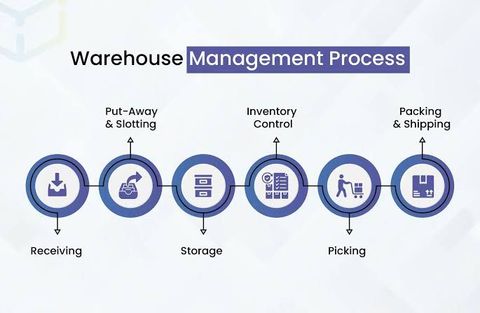
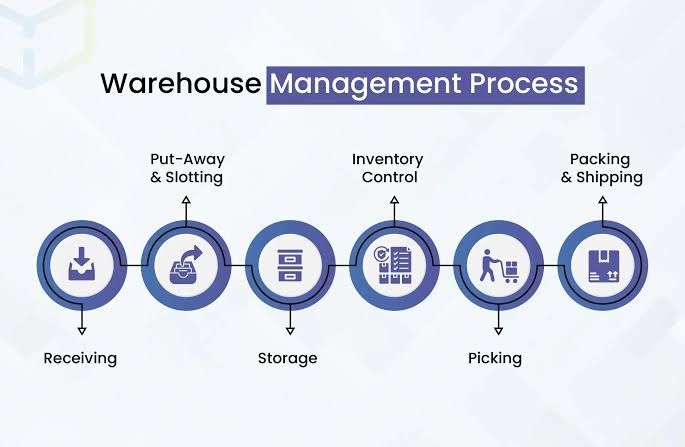
Warehouse operations involve several connected activities. Goods must be received, inspected, recorded, stored, located, picked, packed and dispatched. Each stage needs accurate information to prevent delays and inventory errors.
A warehouse management platform can help businesses address common operational challenges.
1. Better inventory visibility
A WMS maintains digital records of available stock, reserved quantities, damaged goods, pending receipts and dispatched items. Managers can check inventory information without depending entirely on physical registers or repeated manual verification.
2. Improved stock accuracy
Barcode scanning, RFID identification and transaction-level updates help reduce errors during receiving, movement and dispatch. Every recorded stock movement can update the relevant inventory balance.
3. Faster order processing
Warehouse teams can receive organised picking instructions based on product locations, order priorities and dispatch requirements. This can reduce unnecessary movement and improve order preparation.
4. More organised storage
The system can assign products to suitable storage locations based on dimensions, movement frequency, handling requirements and available capacity.
5. Better operational planning
Warehouse managers can review order volumes, stock movement, employee workloads, inventory ageing and dispatch performance through reports and dashboards.
6. Improved coordination
A centralised platform can connect warehouse teams with purchasing, finance, sales, transportation and management departments. This reduces information gaps between business functions.
Major Features of Warehouse Management Software
The capabilities of a WMS vary according to the provider, subscription level and warehouse requirements. However, several features are commonly important when evaluating a platform.
Inventory Tracking and Stock Management
Inventory tracking is one of the central functions of warehouse management software. It records product quantities and locations as goods move through the warehouse.
Typical capabilities include:
Real-time or transaction-based stock updates
SKU and product identification
Batch and lot number tracking
Serial number management
Expiry-date monitoring
Stock reservation for customer orders
Damaged and returned inventory records
Multi-warehouse stock visibility
Minimum and maximum stock alerts
Inventory movement history
For example, a distributor handling electronic components may need to track individual product models, serial numbers and batch details. A food distributor may place greater importance on expiry dates, batch rotation and temperature-related records.
The selected platform should support the inventory structure and tracking requirements of the business.
Barcode and RFID Scanning
Barcode and RFID technology can make warehouse transactions more consistent.
With barcode scanning, employees scan product labels, storage locations or shipment identifiers to record warehouse activities. This can reduce manual data entry and help confirm that the correct item is being handled.
RFID uses radio-frequency identification tags and readers to identify tagged products or assets. Depending on the equipment and warehouse layout, RFID can support faster identification of multiple tagged items without scanning each barcode individually.
| Technology | How It Works | Common Application |
|---|---|---|
| Barcode scanning | Reads printed product or location codes | Receiving, picking and dispatch |
| QR codes | Stores information in a two-dimensional code | Product identification and tracking |
| RFID | Uses radio signals to identify tagged items | Asset tracking and inventory visibility |
| Mobile scanning | Uses handheld devices to record transactions | Stock movement and cycle counting |
Businesses should evaluate scanning hardware, label durability, network coverage and integration requirements before selecting a system.
Warehouse Location Management
A warehouse may contain multiple buildings, floors, aisles, racks, shelves, bins and designated storage areas. Without a consistent location structure, employees may spend unnecessary time searching for products.
A WMS can maintain a digital map of storage locations and associate each inventory record with a specific location.
Common location management capabilities include:
Warehouse and zone configuration
Aisle, rack and bin identification
Product-to-location assignment
Storage capacity monitoring
Put-away recommendations
Location transfers
Restricted storage areas
Inventory relocation records
Some platforms support directed put-away, which recommends where newly received goods should be placed based on available space, product characteristics and warehouse rules.
Receiving and Put-Away Management
Receiving begins when goods arrive from suppliers, manufacturers or other warehouse locations.
A structured receiving workflow may include:
Review the purchase order or expected delivery.
Record the arrival of goods.
Verify product codes and quantities.
Inspect goods for damage or discrepancies.
Record batch, serial or expiry information where applicable.
Confirm accepted quantities in the system.
Generate or assign storage locations.
Complete the put-away transaction.
The system can help identify differences between expected and received quantities. This makes it easier to investigate shortages, excess deliveries and damaged inventory.
Order Picking, Packing and Dispatch
Order fulfilment involves selecting the correct products, preparing them for shipment and recording dispatch information.
A WMS may support several picking methods:
Single-order picking: An employee picks products for one order at a time.
Batch picking: Products for multiple orders are collected during one warehouse trip.
Zone picking: Employees work within assigned warehouse areas.
Wave picking: Orders are grouped and released according to schedules, priorities or transport requirements.
Packing functions can verify quantities, record package details and associate items with shipment identifiers.
Dispatch management can record the carrier, shipment reference, dispatch date and relevant documentation. Integration with transportation platforms can further improve coordination between warehouse and delivery activities.
Returns and Reverse Logistics
Returned goods need to be inspected and assigned an appropriate inventory status.
A warehouse system can help teams record:
Returned product details
Original order references
Reason for return
Inspection results
Damaged or defective quantities
Restocking decisions
Refurbishment or repair requirements
Final inventory disposition
A structured returns process prevents unsuitable goods from being added back into available inventory without inspection.
Warehouse Automation and Advanced Technology
Warehouse automation combines software, equipment and defined workflows to reduce repetitive manual activities and improve operational consistency.
Not every warehouse needs advanced robotics. Businesses can begin with barcode scanning, mobile devices and automated task allocation before considering more complex equipment.
Automated Warehouse Workflows
A WMS can automate routine activities such as:
Stock level notifications
Reorder alerts
Picking task allocation
Put-away recommendations
Order status updates
Inventory reconciliation alerts
Dispatch documentation workflows
Scheduled warehouse reports
Automation rules should be configured carefully. Incorrect product data or poorly designed workflows can cause errors to spread across multiple transactions.
Robotics and Material Handling Equipment
Large distribution centres may use automated guided vehicles (AGVs), autonomous mobile robots (AMRs), conveyor systems, automated storage and retrieval systems (AS/RS), and robotic picking equipment.
These technologies can support repetitive movement and storage tasks. Their suitability depends on warehouse layout, order volume, product characteristics, safety requirements and integration capabilities.
Artificial Intelligence and Predictive Analytics
AI-enabled warehouse platforms may analyse historical transactions and operational data to identify patterns.
Potential applications include:
Forecasting inventory requirements
Identifying seasonal demand patterns
Predicting stock shortages
Recommending storage locations
Identifying unusual inventory movements
Estimating warehouse workloads
Supporting labour and capacity planning
Predictive results depend on data quality, model design and changing business conditions. Managers should review recommendations rather than treating automated predictions as guaranteed outcomes.
Cloud-Based Warehouse Platforms
Cloud-based WMS platforms allow authorised users to access warehouse information through internet-connected devices. They may support multiple locations, centralised reporting, remote administration and software updates.
Before selecting a cloud platform, businesses should examine data hosting arrangements, access controls, backup procedures, system availability, integration options and contractual terms.
Types of Warehouse Management Systems
Different warehouse environments need different levels of functionality. Understanding the main system categories can help businesses identify an appropriate solution.
| WMS Type | Main Characteristics | Suitable Environment |
|---|---|---|
| Standalone WMS | Dedicated warehouse management functions | Independent warehouses |
| ERP-integrated WMS | Connected with finance, purchasing and business operations | Medium and large organisations |
| Cloud-based WMS | Hosted platform with browser or mobile access | Businesses managing distributed operations |
| On-premises WMS | Installed and managed within company infrastructure | Organisations requiring greater infrastructure control |
| Advanced WMS | Supports automation, analytics and complex workflows | Large distribution and fulfilment centres |
Some providers combine these models. For example, a cloud-based WMS may also integrate with an ERP platform and support advanced warehouse automation.
Popular Warehouse Management Software Platforms
Several technology providers have warehouse management products or broader enterprise platforms with warehouse capabilities. Their functionality, licensing structure and regional availability should be checked before selection.
| Platform | Main Capabilities | Common Consideration |
|---|---|---|
| SAP Extended Warehouse Management | Advanced warehouse processes and enterprise integration | Complex warehouse environments |
| Oracle Warehouse Management | Inventory visibility, fulfilment and warehouse execution | Organisations using Oracle applications |
| Microsoft Dynamics 365 Supply Chain Management | Warehouse operations and supply chain integration | Businesses using Microsoft enterprise systems |
| Infor WMS | Warehouse execution, inventory and distribution workflows | Distribution and manufacturing operations |
| Manhattan Active Warehouse Management | Enterprise warehouse management and fulfilment capabilities | Large and complex operations |
| Zoho Inventory | Inventory, order and warehouse-related management functions | Smaller and growing businesses |
| Odoo Inventory | Inventory operations and connected business applications | Businesses seeking modular ERP capabilities |
The best platform depends on operational complexity, existing business applications, warehouse size, integration requirements and future expansion plans. A product with many advanced features may not be the right choice for a business with straightforward inventory workflows.
WMS vs Inventory Management Software vs ERP
These systems can overlap, but they generally focus on different areas of business operations.
| System | Primary Focus | Typical Functions |
|---|---|---|
| Warehouse Management System | Physical warehouse activities | Receiving, put-away, picking, packing and dispatch |
| Inventory Management Software | Stock visibility across business operations | Stock levels, transfers, adjustments and replenishment |
| Enterprise Resource Planning | Connected business-wide operations | Finance, purchasing, sales, manufacturing and reporting |
An inventory platform may be sufficient for a business with a small storage facility and simple stock movement. A dedicated WMS becomes more relevant when a warehouse has multiple locations, complex picking requirements, frequent transactions or strict traceability needs.
An ERP system may provide warehouse functions directly or connect with a specialised WMS.
How to Choose the Right Warehouse Management Software
Selecting a WMS requires an understanding of present operational challenges and future requirements.
1. Review Warehouse Size and Complexity
Start by assessing the number of storage locations, product categories, daily transactions, warehouse employees and order volumes.
A single-location warehouse may need straightforward stock tracking. A multi-site distribution network may require advanced location management, centralised reporting and automated workflows.
2. Identify Essential Features
Prepare a list of capabilities that are necessary for daily operations.
For example:
Barcode or RFID support
Multiple warehouse management
Batch and serial tracking
Expiry-date controls
Order picking and packing
Returns management
Inventory reports
Mobile access
Role-based permissions
ERP and ecommerce integration
Separate essential requirements from optional features to keep the evaluation focused.
3. Examine Integration Capabilities
The WMS may need to exchange information with accounting platforms, ERP applications, purchasing systems, ecommerce websites, payment platforms and transportation applications.
Check whether the provider supports APIs, standard connectors, data imports and exports, and reliable synchronisation.
Integration should be tested using realistic transactions before full deployment.
4. Evaluate Reporting and Analytics
Warehouse managers should be able to monitor stock accuracy, order processing, inventory ageing, picking productivity and dispatch performance.
A useful reporting system should allow managers to filter information by warehouse, product, date, employee or order status.
5. Review Security and Access Controls
Inventory and operational information should be accessible only to authorised users.
Look for role-based permissions, multi-factor authentication, activity logs, encryption, backup arrangements and documented incident response procedures.
6. Check Implementation and Training Requirements
A software platform is only effective when warehouse employees understand how to use it.
Review onboarding support, training materials, data migration arrangements, hardware compatibility and the provider's implementation process.
7. Conduct a Pilot Before Full Deployment
Test the system in one warehouse area or with a selected product category.
A pilot can help identify inaccurate product records, scanning problems, workflow gaps and integration issues before the platform is introduced across the entire operation.
Warehouse Management KPIs and Performance Metrics
Warehouse performance should be measured using consistent indicators rather than relying only on overall stock value or dispatch volume.
| KPI | What It Measures | Why It Matters |
|---|---|---|
| Inventory Accuracy | Difference between recorded and physical stock | Highlights inventory discrepancies |
| Order Picking Accuracy | Correctness of picked items | Helps reduce fulfilment errors |
| Order Cycle Time | Time between order release and completion | Indicates fulfilment efficiency |
| On-Time Dispatch Rate | Orders dispatched by the planned deadline | Measures dispatch reliability |
| Inventory Turnover | Frequency of inventory movement over a period | Helps evaluate stock utilisation |
| Space Utilisation | Use of available warehouse capacity | Supports storage planning |
| Return Rate | Proportion of orders or products returned | Helps identify product or fulfilment issues |
| Receiving Accuracy | Accuracy of recorded incoming goods | Highlights supplier and receiving discrepancies |
KPIs should be defined consistently across warehouses. For example, businesses should specify whether order cycle time ends at packing completion, dispatch confirmation or carrier collection.
Practical Steps for Implementing a WMS
A structured implementation process can reduce disruption and improve adoption.
Step 1: Map existing workflows
Document how goods currently move through receiving, storage, picking, packing, dispatch and returns.
Step 2: Clean inventory records
Standardise product names, SKUs, barcodes, units of measurement, batch information and storage location details.
Step 3: Design the warehouse structure
Create a consistent location hierarchy covering warehouses, zones, aisles, racks, shelves and bins.
Step 4: Configure business rules
Define receiving checks, put-away logic, stock reservations, picking priorities, replenishment alerts and returns procedures.
Step 5: Integrate business applications
Connect the WMS with relevant ERP, accounting, purchasing, ecommerce and transportation platforms.
Step 6: Train warehouse employees
Provide practical training for scanners, mobile applications, inventory adjustments and order processing.
Step 7: Run pilot transactions
Test receipts, transfers, picking, packing, dispatches and returns. Compare digital records with physical stock.
Step 8: Monitor performance after launch
Review inventory accuracy, transaction errors, processing time and employee feedback. Improve workflows when the data identifies recurring problems.
Common Warehouse Management Challenges
Implementing software does not automatically eliminate operational problems. Businesses should plan for the following challenges.
Incorrect inventory data: Duplicate product records, inaccurate units and missing SKUs can reduce system reliability. Data cleansing should happen before migration.
Employee resistance: Employees accustomed to manual registers may need time to adapt. Practical training and clear procedures can improve adoption.
Integration difficulties: Older business applications may not exchange information easily with a new WMS. Technical compatibility should be checked early.
Connectivity interruptions: Warehouses with unreliable network coverage may experience scanning or synchronisation delays. Offline functionality and recovery procedures should be evaluated.
Poorly designed warehouse layouts: Software cannot compensate fully for unsuitable storage arrangements. Physical layout, product placement and movement paths should be reviewed.
Unclear performance measurements: If different teams calculate KPIs differently, management reports may become misleading. Standard definitions and reporting rules are important.
Recent Developments in India's Warehouse and Logistics Ecosystem
India's logistics environment is increasingly focused on digital integration, data visibility and coordinated infrastructure planning. These developments are relevant to businesses evaluating warehouse technology.
1. Economic Survey 2025–26 and logistics digitisation
The Economic Survey 2025–26 describes the role of the National Logistics Policy, Logistics Ease Across Different States (LEADS), PM GatiShakti and the Unified Logistics Interface Platform (ULIP). It reports that ULIP connects 44 systems across 11 ministries through more than 2,000 data fields, with over 1,700 companies registered and more than 200 crore API transactions recorded. This reflects the growing importance of connected logistics information and digital coordination. <Link ref="turn590074search29" title="Economic Survey 2025–26"/>
2. Digital warehouse administration through ICEGATE
In April 2025, ICEGATE published guidance for its warehouse module. The guidance explains registration requirements for existing warehouse licensees and the use of the portal for relevant warehouse administration and return filing. Businesses operating regulated customs warehouses should review the applicable module requirements rather than assuming an ordinary commercial WMS fulfils regulatory obligations. <Link ref="turn590074search34" title="ICEGATE Warehouse Module FAQs"/>
3. Continued development of the National Logistics Policy
The National Logistics Policy, launched in September 2022, promotes a technologically enabled, integrated and resilient logistics ecosystem. It complements PM GatiShakti and supports process improvement, digitalisation, logistics development and workforce skills. These initiatives provide a broader policy context for warehouse digitisation and supply chain integration. <Link ref="turn590074search5" title="DPIIT National Logistics Policy"/>
Laws, Regulations and Compliance Considerations in India
Warehouse management software should support accurate records, but businesses remain responsible for meeting the laws and regulations applicable to their activities.
Goods and Services Tax Records
Section 35 of the Central Goods and Services Tax Act, 2017 addresses the maintenance of accounts and records, including stock details. It also contains record-keeping requirements relevant to warehouse and godown operators.
A WMS can help maintain digital inventory records, inward and outward movement details and supporting transaction histories. Businesses should ensure that their system configuration and retention procedures align with applicable GST requirements. <Link ref="turn590074search4" title="Central Goods and Services Tax Act"/>
E-Way Bill Requirements
Under Rule 138 of the CGST Rules, an e-way bill is generally required before the movement of goods where the consignment value exceeds ₹50,000, subject to prescribed exceptions and conditions.
Businesses should coordinate warehouse dispatch records with the applicable e-way bill process. The WMS may help prepare or exchange relevant shipment information, but the organisation should verify that the required document has been generated correctly through the official system. <Link ref="turn590074search0" title="CBIC E-Way Bill Rules"/>
Customs Warehouse Requirements
Businesses operating customs-bonded warehouses may have additional licensing, record-keeping and reporting obligations under applicable customs laws and regulations.
The ICEGATE warehouse module provides a digital mechanism for relevant warehouse administration. Companies should confirm their licence category, registration requirements and reporting responsibilities with the appropriate customs authorities. <Link ref="turn590074search3" title="ICEGATE Warehouse Guidance"/>
Data Protection and Cybersecurity
Warehouse platforms may store employee details, supplier information, customer records, shipment references and operational data.
Businesses should review applicable data protection obligations, restrict access to sensitive records, maintain suitable security controls and establish procedures for handling security incidents. The Digital Personal Data Protection Act, 2023 and applicable rules should be considered where personal data is processed.
Tools and Resources for Warehouse Management
Businesses can use a combination of software, government portals and operational technologies to improve warehouse visibility.
Warehouse Management Platforms: Evaluate SAP, Oracle, Microsoft Dynamics 365, Infor and Manhattan for enterprise warehouse requirements.
Inventory Applications: Consider platforms such as Zoho Inventory and Odoo for inventory and order management requirements.
Barcode and RFID Equipment: Use compatible scanners, printers, tags and readers to support accurate product identification.
ERP Integration: Connect warehouse transactions with purchasing, finance, sales and inventory records.
GST Common Portal: Refer to the official GST and e-way bill systems for applicable movement documentation.
ICEGATE: Use the official portal for relevant customs and warehouse administration.
ULIP: Review the Unified Logistics Interface Platform for information on India's digital logistics integration ecosystem.
Businesses should assess each tool according to their warehouse processes, technical environment and regulatory responsibilities.
Frequently Asked Questions
1. What is warehouse management software?
Warehouse management software is a digital platform used to manage inventory storage, receiving, picking, packing, dispatch and other warehouse activities. It helps businesses maintain stock records and coordinate daily warehouse workflows.
2. How is WMS different from inventory management software?
Inventory management software primarily tracks stock quantities, movements and availability. A WMS focuses more deeply on physical warehouse activities, including storage locations, put-away, picking, packing and dispatch. Some platforms combine both capabilities.
3. Can warehouse management software support multiple warehouses?
Yes. Many platforms support multiple warehouse locations, stock transfers, centralised inventory visibility and location-specific reports. The available capabilities depend on the selected product and configuration.
4. Is barcode scanning necessary for a WMS?
Barcode scanning is not compulsory for every warehouse, but it can improve transaction accuracy and reduce manual data entry. Businesses with high inventory movement or large product catalogues may find scanning particularly useful.
5. What should a business consider before implementing a WMS?
A business should review warehouse size, inventory complexity, required features, integration capabilities, employee training, data quality, security and future expansion plans. A pilot implementation can help identify problems before full deployment.
Conclusion
Warehouse management software plays an important role in modern inventory and distribution operations. By connecting receiving, storage, stock tracking, order picking, packing, dispatch and returns, a WMS can give businesses better control over warehouse activities.
The right platform depends on the organisation's product range, transaction volume, warehouse structure, technology environment and compliance requirements. Smaller operations may need straightforward inventory and order management, while larger distribution networks may require advanced automation, analytics and enterprise integration.
A careful selection process, accurate inventory data, employee training and regular performance monitoring can help businesses build more reliable warehouse operations and prepare for future growth.