AI Workflow Automation: Discover Business Processes, Intelligent Tools and Productivity
AI workflow automation combines artificial intelligence with business process automation to help organisations complete repetitive tasks, process information, coordinate applications and improve operational efficiency. Instead of relying entirely on manual instructions and fixed software rules, AI-enabled workflows can interpret information, identify patterns, generate responses and support decisions within defined business processes.
For example, a company receiving hundreds of supplier invoices may use an automated workflow to extract invoice details, compare them with purchase orders, identify discrepancies and send approved records to its accounting system. Employees can focus on exceptions rather than manually processing every document.
Similarly, a sales department can automate lead classification, customer enquiry routing, meeting summaries and follow-up reminders. A manufacturing business can connect production data with inventory planning and maintenance alerts.
AI workflow automation includes several technologies, such as machine learning, generative AI, robotic process automation (RPA), natural language processing, intelligent document processing and AI agents.
The objective is not simply to automate more activities. It is to design connected business processes that improve accuracy, reduce unnecessary manual work and provide measurable productivity benefits.
Why AI Workflow Automation Matters for Businesses
Many organisations use multiple applications to manage finance, customer relationships, procurement, inventory, HR and internal communication. When these systems operate separately, employees often spend significant time transferring information, checking records and following up on pending tasks.
AI workflow automation can connect these activities and improve how information moves across departments.
Important business benefits include:
Reduced repetitive work: Automates routine data entry, document processing and task routing.
Faster processing: Helps complete recurring activities with fewer manual hand-offs.
Improved accuracy: Applies validation rules and identifies unusual information for review.
Better information access: Helps employees search documents, summarise records and retrieve relevant information.
Operational visibility: Tracks task status, pending approvals and workflow performance.
Improved coordination: Connects departments through consistent processes and shared information.
Scalable operations: Helps organisations manage higher transaction volumes without increasing manual effort at the same rate.
The actual benefits depend on process quality, system integration, data reliability, employee adoption and the level of human oversight.
What Is AI Workflow Automation?
AI workflow automation uses artificial intelligence to perform or support tasks within a defined sequence of business activities.
A traditional workflow usually follows predetermined rules. For example, an invoice may be sent to a manager whenever its value exceeds a particular approval limit.
An AI-enabled workflow can perform additional activities. It may extract invoice information, classify the document, compare it with previous transactions, identify unusual entries and recommend the appropriate approval route.
Traditional workflow automation
Follows predefined conditions and rules.
Works well with predictable, structured activities.
Usually requires clear input fields and defined process steps.
May struggle with unstructured documents or changing information.
AI-powered workflow automation
Can interpret text, documents, images and other information.
Can classify and summarise unstructured content.
Can identify patterns and recommend next steps.
Can support more flexible processes through AI models and agents.
Requires additional controls for accuracy, privacy and accountability.
AI does not make every workflow fully autonomous. Many business processes still require employee verification, approval and exception handling.
Major Business Processes That Can Be Automated With AI
AI workflow automation can support different departments. Businesses should identify processes with repetitive tasks, measurable delays and suitable data before selecting automation technology.
1. Finance and Accounting
Finance departments handle invoices, purchase records, expenses, payment approvals and financial reports. These activities often involve substantial document processing.
AI automation can support:
Invoice data extraction and classification.
Purchase order and invoice matching.
Expense categorisation.
Payment approval routing.
Financial report summarisation.
Unusual transaction identification.
Accounts payable and receivable monitoring.
For example, an organisation can configure a workflow to extract supplier details from an invoice, compare the information with an approved purchase order and flag mismatches for the finance team.
2. Human Resources
HR departments can use AI automation to manage recurring administrative activities and improve access to internal information.
Common applications include:
Employee onboarding document collection.
Internal policy search.
Training recommendations.
Leave request routing.
Employee feedback classification.
Workforce reporting.
Interview scheduling support.
Sensitive decisions involving recruitment, employee evaluation or compensation should remain subject to appropriate human review and fairness controls.
3. Sales and Customer Relationship Management
Sales teams manage leads, customer enquiries, follow-ups, proposals and account information.
AI workflow automation can help with:
Lead classification and prioritisation.
Customer enquiry routing.
CRM record updates.
Meeting transcription and summaries.
Follow-up task creation.
Sales pipeline reporting.
Drafting personalised communication for review.
A connected workflow can capture an enquiry, identify its subject, assign it to the appropriate sales representative and update the CRM record.
4. Procurement and Supply Chain
Procurement departments coordinate purchase requests, supplier documents, quotations, inventory records and approvals.
AI can assist with:
Purchase request classification.
Supplier document extraction.
Quotation comparison.
Purchase order preparation.
Inventory alerts.
Delivery document verification.
Supplier risk information analysis.
Automated recommendations should not replace contractual checks or authorised procurement decisions.
5. Customer Support
Customer support teams receive enquiries through email, chat, telephone and online forms.
AI-enabled workflows can classify incoming messages, retrieve relevant knowledge articles, prepare response drafts and route complex cases to the correct team.
Applications include:
Enquiry categorisation.
Frequently asked question handling.
Customer conversation summaries.
Escalation identification.
Complaint classification.
Support ticket prioritisation.
Human intervention remains important for complaints, sensitive matters and situations requiring judgement.
6. Legal and Compliance
Legal and compliance teams work with contracts, policy documents, regulatory updates and internal records.
AI workflow automation can assist with document classification, contract clause extraction, deadline reminders, policy comparisons and regulatory research.
AI-generated legal interpretations should be reviewed by qualified professionals before they influence important business decisions.
7. IT and Internal Operations
IT teams can use automation to classify support tickets, summarise incident reports, route access requests and monitor routine system alerts.
AI agents may also coordinate approved actions across internal applications, subject to access restrictions and audit requirements.
Types of Intelligent Automation Technologies
AI workflow automation often combines several technologies rather than depending on a single tool.
| Technology | Main function | Business application |
|---|---|---|
| Robotic Process Automation (RPA) | Performs repetitive actions through software interfaces | Data entry and record updates |
| Machine Learning | Identifies patterns from historical data | Forecasting and classification |
| Generative AI | Creates and summarises content | Document drafting and internal knowledge assistance |
| Natural Language Processing | Interprets human language | Email and enquiry classification |
| Intelligent Document Processing | Extracts information from documents | Invoice and contract processing |
| Computer Vision | Analyses images and visual information | Quality inspection and document recognition |
| AI Agents | Coordinate multi-step tasks using connected tools | Workflow execution and internal task coordination |
| Business Process Management (BPM) | Designs, manages and monitors business workflows | Approval and operational process management |
The best approach depends on the task. A fixed approval sequence may need conventional automation, while a workflow involving unstructured documents may benefit from AI-based extraction and classification.
How AI Agents Work in Business Workflows
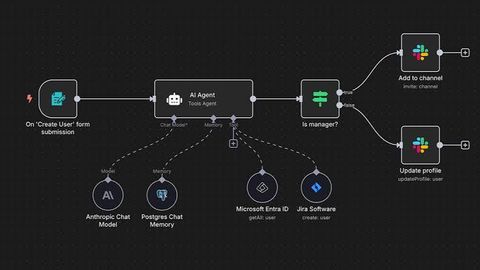
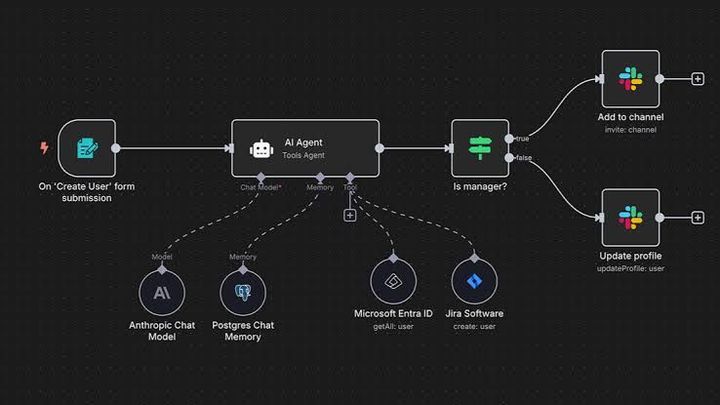
AI agents are software systems that can interpret instructions, use permitted tools, retrieve information and perform multiple steps toward a defined objective.
Unlike a basic chatbot that primarily responds to questions, an AI agent may interact with approved business applications to complete specific tasks.
For example, consider an internal procurement request:
An employee submits a purchase request.
An AI agent reads the request and identifies the required product category.
It checks approved supplier information and relevant purchasing records.
It prepares a comparison for the procurement team.
It routes the request for authorised approval.
After approval, a connected workflow can create the purchase order.
The system records the activity for monitoring and audit purposes.
The agent should not independently approve transactions beyond its assigned authority.
Important capabilities of AI agents include:
Understanding natural-language instructions.
Retrieving information from approved data sources.
Interacting with connected applications.
Coordinating multiple workflow steps.
Responding to errors or missing information.
Recording actions and reporting task status.
Businesses should apply least-privilege access, transaction limits, approval checkpoints and monitoring to prevent unintended actions.
Popular AI Workflow Automation Tools
Businesses can choose from automation platforms, enterprise workflow systems, AI development environments and integration tools.
| Platform or tool | Main capabilities | Common business use |
|---|---|---|
| Microsoft Power Automate | Workflow automation and application integration | Microsoft 365 and business processes |
| Zapier | Application connections and automated workflows | Marketing, CRM and administrative tasks |
| Make | Visual workflow design and integrations | Multi-application process automation |
| UiPath | Robotic process automation and intelligent automation | Finance and enterprise operations |
| ServiceNow | Enterprise workflow management and AI-enabled operations | IT, HR and internal processes |
| n8n | Workflow orchestration and AI integrations | Custom business automation |
| Workato | Enterprise integration and workflow automation | Cross-department process coordination |
| Salesforce Agentforce | AI agents and CRM-related automation | Sales and customer operations |
Tool availability, capabilities and pricing arrangements can change. Businesses should review current product documentation, security controls, integration requirements and licensing terms before choosing a platform.
Connecting AI Automation With Existing Business Systems
Automation becomes more useful when it can exchange information with the applications employees already use.
Common enterprise systems include:
CRM platforms: Manage customer information, leads and sales activities.
ERP platforms: Coordinate finance, inventory, procurement and production.
Accounting systems: Maintain invoices, expenses and financial records.
HR platforms: Manage employee records and internal administration.
Document management systems: Store contracts, reports and business documents.
Communication applications: Coordinate emails, messages, meetings and notifications.
Data platforms: Provide structured information for reporting and AI analysis.
Integration can take place through application programming interfaces (APIs), prebuilt connectors, webhooks, database connections and approved automation interfaces.
Before connecting applications, businesses should check data permissions, authentication methods, access scopes, error handling and audit logging.
Data Readiness for AI Workflow Automation
Reliable data is essential for effective automation. AI systems may generate incorrect classifications, summaries or recommendations when the underlying information is incomplete or inconsistent.
Businesses should evaluate the following areas before implementation.
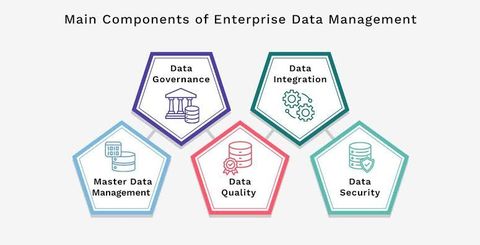
1. Data Quality
Check whether records contain accurate, complete and consistent information. Duplicate customer entries, incorrect supplier details and missing invoice fields can affect workflow results.
2. Data Accessibility
Identify where relevant information is stored and whether the automation platform can access it through approved methods.
3. Data Integration
Determine how information will move between existing applications. Different systems may use different formats, identifiers and data structures.
4. Data Security
Classify confidential information and apply access controls. Employees and AI applications should only access information required for their assigned tasks.
5. Data Governance
Establish clear rules for data ownership, retention, accuracy, permitted usage and accountability.
6. Document Readiness
For workflows involving invoices, contracts or scanned records, assess document quality, file formats and extraction accuracy.
AI Workflow Automation Implementation Strategy
A structured implementation approach helps organisations avoid automating inefficient processes or investing in technology without clear objectives.
Step 1: Map existing business processes
Document how a task currently moves between employees, applications and departments.
Identify repetitive activities, approval delays, duplicate data entry and common errors.
Step 2: Identify suitable automation opportunities
Select workflows with clearly defined inputs, outputs and performance measures.
Good starting points often include invoice classification, enquiry routing, meeting summaries, document extraction and internal reporting.
Step 3: Evaluate technology requirements
Decide whether the process requires rule-based automation, RPA, machine learning, generative AI or an AI agent.
Avoid using a complex AI system when a simpler automation rule can complete the task reliably.
Step 4: Prepare data and application access
Check data quality, system compatibility, user permissions and integration requirements.
Step 5: Define human approval points
Determine which activities can run automatically and which require employee verification.
Financial transfers, contractual commitments, employee decisions and sensitive customer actions generally need stronger approval controls.
Step 6: Run a controlled pilot
Test the workflow using representative records and realistic operating conditions. Include unusual cases, missing information and system failures.
Step 7: Measure performance
Compare processing time, error rates, employee effort and operating expenses against the existing process.
Step 8: Expand gradually
Extend successful workflows to additional teams after reviewing performance, security and user feedback.
Step 9: Monitor and improve
Review automation logs, failed tasks, AI output quality, access permissions and changes in business processes.
Measuring Productivity and Business ROI
AI workflow automation should be evaluated through measurable operational and financial outcomes.
A useful starting point is to compare the current process with the automated process.
Important performance indicators include:
| Metric | What it measures | Business importance |
|---|---|---|
| Processing Time | Time required to complete a task | Measures speed improvements |
| Automation Rate | Percentage of eligible tasks completed automatically | Tracks automation coverage |
| Error Rate | Frequency of incorrect results | Measures process reliability |
| Manual Intervention Rate | Share of tasks requiring employee correction | Identifies automation limitations |
| Cost per Transaction | Average expense of processing an activity | Evaluates operating efficiency |
| Employee Time Saved | Reduction in manual working hours | Measures productivity gains |
| Workflow Completion Rate | Percentage of tasks completed successfully | Tracks operational performance |
| System Availability | Time the automation remains operational | Measures reliability |
Illustrative productivity example
Consider a company processing 2,000 invoices each month.
| Activity | Existing process | AI-assisted process |
|---|---|---|
| Average processing time per invoice | 12 minutes | 4 minutes |
| Total monthly processing time | 400 hours | 133.3 hours |
| Estimated monthly time saved | — | 266.7 hours |
The example assumes that the automated process completes the initial extraction and validation stages, with employees reviewing exceptions and approving transactions.
Actual results will vary according to document quality, exception rates, system integration and employee review requirements.
Calculating AI workflow ROI
A basic formula is:
ROI = [(Total Benefits − Total Investment) ÷ Total Investment] × 100
Benefits may include reduced administrative effort, fewer processing errors, shorter turnaround times and improved operational capacity.
Investment should include platform subscriptions, integration, implementation, infrastructure, employee training, security controls and ongoing monitoring.
Businesses should use verified financial savings rather than treating every hour saved as direct cash savings. Productivity gains may create additional capacity without immediately reducing payroll expenses.
Risks and Challenges in AI Workflow Automation
Automation can introduce new operational and technology risks if systems are not properly configured.
Incorrect AI decisions: AI models may misclassify documents, misunderstand instructions or produce inaccurate summaries.
Data privacy exposure: Sensitive employee, customer or financial information may be accessed or disclosed through poorly controlled integrations.
Unauthorised actions: AI agents with excessive permissions may modify records or initiate actions beyond their intended responsibilities.
Integration failures: Changes to application interfaces or authentication systems can interrupt connected workflows.
Cybersecurity threats: Prompt injection, malicious documents, compromised credentials and data leakage can affect AI-enabled processes.
Employee resistance: Employees may be uncertain about new workflows or concerned about changes to their responsibilities.
Vendor dependency: Heavy reliance on one platform can create migration challenges and operational continuity concerns.
Unclear financial returns: Automation projects may not produce expected results if the original process is poorly designed or adoption remains low.
Businesses should establish testing, monitoring, access controls, backup procedures and human escalation mechanisms before deploying automation at scale.
Best Practices for Responsible AI Automation
A reliable AI automation programme requires clear accountability and continuous oversight.
Start with business problems rather than technology demonstrations.
Document each workflow and its approval requirements.
Use the minimum permissions needed for each automation.
Verify AI-generated information before important decisions.
Keep human approval for sensitive or high-impact actions.
Maintain records of automated activities and system changes.
Protect confidential and personal information.
Test workflows with incomplete, unusual and incorrect inputs.
Establish procedures for failed tasks and system interruptions.
Train employees to understand AI capabilities and limitations.
Review performance and security regularly.
An organisation should also maintain a record of which workflows use AI, what information they access and who is accountable for their operation.
Recent Developments in India: 2026
AI workflow automation is increasingly moving beyond basic task automation towards connected, agent-based business processes.
1. NPCI launches agentic AI platforms
On 9 September 2026, the National Payments Corporation of India announced two agentic AI platforms at Global Fintech Fest 2026: AiNxt and Agentic Orchestration & Messaging (AtOM).
The announcement described AtOM as an orchestration platform intended to coordinate complex integration, change-management, partner onboarding and certification workflows across different technology environments. The development illustrates how agentic AI can support multi-step enterprise processes rather than simply answer questions. <Link ref="turn287134search40" title="NPCI announcement on AiNxt and AtOM"/>.
2. Enterprise AI workflow platforms expand in India
On 6 October 2026, ServiceNow announced its AI Workflow Factory and Autonomous Engineer capabilities in Mumbai. The announcement focused on identifying opportunities for AI-enabled workflow improvements and coordinating enterprise AI workflows across existing infrastructure.
This reflects growing interest in combining AI agents, workflow orchestration and enterprise governance. <Link ref="turn287134search8" title="ServiceNow AI Workflow Factory announcement"/>.
3. India's AI Governance Guidelines
India's AI Governance Guidelines provide a principle-based framework for responsible AI development and deployment. The seven guiding principles emphasise trust, people-first design, fairness, accountability, transparency, safety and responsible innovation.
These principles are relevant to organisations deploying AI agents or automation systems that interact with customer records, employee information and business applications. <Link ref="turn287134search6" title="Government of India — AI Governance Guidelines"/>.
Laws and Regulatory Considerations in India
Businesses implementing AI workflow automation should evaluate the legal requirements applicable to the information and activities involved.
1. Digital Personal Data Protection Act, 2023
The DPDP Act establishes a framework for processing digital personal data in India. Organisations using AI to process customer, employee or other personal information should evaluate lawful processing, applicable consent requirements, purpose limitation, data security and individual rights.
The Digital Personal Data Protection Rules, 2025 were notified on 14 November 2025 and provide a phased implementation schedule. Rules 1, 2 and 17–21 commenced upon publication; Rule 4 is scheduled to commence after one year, and Rules 3, 5–16, 22 and 23 after eighteen months. Businesses should check the commencement date of each relevant provision rather than assume that every requirement applies simultaneously. <Link ref="turn287134search36" title="Official DPDP Rules, 2025"/> and <Link ref="turn287134search0" title="MeitY explanation of the DPDP framework"/>.
2. Information Technology Act, 2000
The Information Technology Act and applicable rules are relevant to electronic records, unauthorised access, cybersecurity and certain forms of online activity. Businesses should review the requirements applicable to their digital systems and automation processes.
3. CERT-In Directions
Organisations should consider applicable CERT-In cybersecurity directions, including requirements concerning incident reporting, log retention and designated points of contact, where relevant to their operations.
4. Copyright Act, 1957
AI workflows that process documents, images, software or other protected material should be assessed for copyright ownership, licensing and permitted usage.
5. Sector-specific requirements
Businesses operating in banking, insurance, securities, healthcare and telecommunications may need to follow additional requirements issued by their sector regulators. Automated decisions involving customer eligibility, financial transactions or sensitive information require particular attention.
The legal position depends on the activity, data type, sector and system design. Organisations should obtain appropriate legal and compliance guidance before deploying high-impact workflows.
Tools and Resources for AI Workflow Automation
Businesses can explore different tools depending on the complexity of their processes and existing technology environment.
Microsoft Power Automate: Useful for connecting Microsoft applications and creating approval workflows.
Zapier: Supports automation across a wide range of business applications.
Make: Provides visual workflow design and multi-application integration.
UiPath: Supports RPA and enterprise intelligent automation.
n8n: Provides workflow orchestration and AI integrations for custom processes.
ServiceNow: Supports enterprise workflow management and AI-enabled operational processes.
Workato: Helps connect enterprise applications and coordinate business workflows.
NIST AI Risk Management Framework: Provides guidance for identifying and managing AI-related risks.
India AI Governance Guidelines: Provide a national reference for responsible AI adoption in India.
Businesses should compare data handling policies, access controls, integration capabilities, audit features, scalability and total ownership expenses before selecting a platform.
Frequently Asked Questions
1. What is AI workflow automation?
AI workflow automation uses artificial intelligence and connected software systems to perform or support business activities such as document processing, information classification, customer enquiry routing and internal approvals.
2. How is AI workflow automation different from traditional automation?
Traditional automation generally follows predefined rules and conditions. AI workflow automation can also interpret unstructured information, identify patterns, generate content and support more flexible decisions within controlled processes.
3. Which business processes are suitable for AI automation?
Invoice processing, customer enquiry classification, document extraction, CRM updates, meeting summaries, procurement workflows, internal knowledge searches and routine reporting are common starting points.
4. What is the difference between an AI agent and workflow automation?
Workflow automation coordinates a sequence of tasks. An AI agent can interpret an objective, use approved tools and determine suitable next steps within defined permissions. AI agents can operate inside larger automated workflows.
5. How can businesses measure AI automation productivity?
Businesses can measure processing time, employee hours saved, automation rate, error frequency, manual intervention, workflow completion and financial ROI. Results should be compared with the original process using consistent measurement periods.
Conclusion
AI workflow automation can help businesses improve repetitive processes, connect applications and make better use of organisational information. Finance, HR, procurement, customer support, sales, legal and IT departments all have opportunities to use intelligent automation where the underlying process is suitable.
Successful implementation requires more than choosing an AI tool. Organisations need clear process definitions, reliable data, appropriate application integration, human approval points and ongoing performance monitoring.
For Indian enterprises, developments in agentic AI platforms and the national AI governance framework highlight the growing importance of combining automation with accountability and security. Businesses that begin with measurable use cases and expand gradually can build more reliable, productive and scalable workflows.