ERP Implementation: Discover Planning, Software Integration and Business Operations
Enterprise Resource Planning (ERP) implementation is the process of introducing an integrated software system to manage important business activities through a shared information environment. Instead of maintaining separate systems for finance, inventory, purchasing, sales, production and human resources, an ERP platform connects these functions through coordinated workflows and common business records.
For example, a manufacturing company may use one application for accounting, another for warehouse management and separate spreadsheets for procurement and production planning. This can create duplicate entries, delayed updates and inconsistent reports.
An ERP system can connect these activities. When a purchase order is approved, the relevant information can flow into procurement, inventory, accounts payable and financial reporting according to the configured workflow.
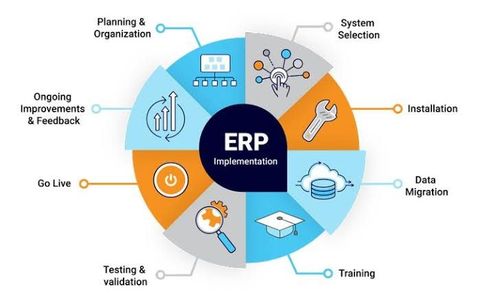
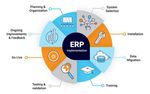
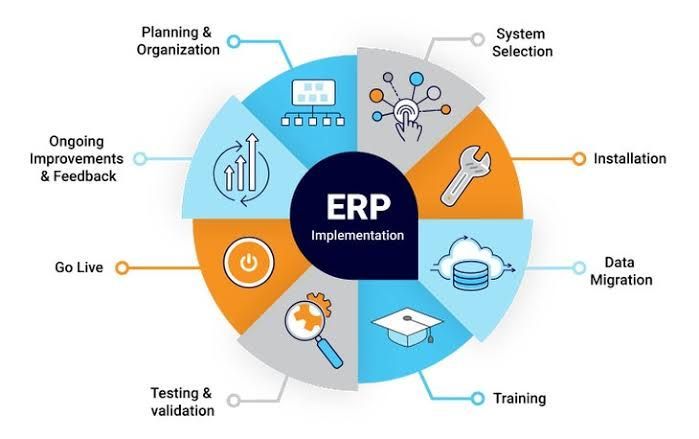
However, successful ERP implementation requires more than purchasing software. Businesses must evaluate their processes, select suitable technology, configure the system, migrate existing information, connect other applications and prepare employees for operational changes.
The right implementation approach depends on business size, industry, transaction volume, existing technology, regulatory requirements and long-term operational objectives.
Why ERP Implementation Matters for Businesses
An ERP platform can provide a more coordinated view of business operations. It helps departments work with shared records and standardised processes instead of depending on disconnected information.
Important business benefits include:
Centralised information: Departments can access approved business records through connected modules.
Improved financial visibility: Finance teams can monitor transactions, receivables, payables, budgets and reporting information.
Inventory control: Businesses can track stock movements, warehouse balances, purchase requirements and product availability.
Procurement coordination: Purchase requests, approvals, supplier records and purchase orders can follow defined workflows.
Operational efficiency: Standardised processes can reduce repeated data entry and manual reconciliation.
Better management reporting: Integrated information can help managers compare performance across departments and locations.
Improved traceability: Transaction histories and approval records can support internal reviews and audit preparation.
Scalable operations: A properly designed ERP environment can accommodate additional locations, business units and transaction volumes.
ERP implementation does not automatically guarantee these outcomes. Benefits depend on appropriate configuration, reliable information, employee adoption and continuous system management.
Main Modules in an ERP System
ERP software generally consists of functional modules that share information through a common platform. Businesses can select modules according to their operational requirements.
| ERP module | Main functions | Business application |
|---|---|---|
| Financial management | General ledger, accounts payable, accounts receivable and budgeting | Financial control |
| Inventory management | Stock levels, product movements and warehouse records | Inventory planning |
| Procurement | Purchase requests, supplier records and purchase orders | Purchasing operations |
| Sales management | Quotations, orders, billing and customer transactions | Revenue operations |
| Manufacturing | Production planning, work orders and material requirements | Factory operations |
| Human resources | Employee records, attendance and payroll workflows | Workforce administration |
| Supply chain management | Logistics, demand planning and supplier coordination | Distribution planning |
| Project management | Project budgets, resources and progress tracking | Project operations |
| Customer management | Customer records and sales interactions | Customer relationship management |
| Reporting and analytics | Dashboards, financial reports and operational indicators | Management decisions |
Some ERP platforms include most of these functions in one product, while others connect specialist applications through integrations.
ERP Implementation Planning
Planning is one of the most important stages of an ERP project. Poor preparation can lead to incorrect software selection, delayed implementation, excessive customisation and unexpected operational disruption.
1. Define business objectives
Start by identifying the problems the organisation wants to address. Objectives may include improving financial reporting, reducing inventory discrepancies, standardising procurement or connecting multiple business locations.
Each objective should be measurable. For example, a company may aim to reduce the time required to close monthly accounts or improve inventory record accuracy.
2. Assess existing business processes
Document how departments currently perform their work. Review approval procedures, transaction flows, reporting requirements and manual activities.
This assessment helps identify which processes should be retained, improved or redesigned before they are transferred to the ERP environment.
3. Identify project stakeholders
ERP projects involve several departments. Include finance, operations, procurement, IT, HR, compliance and senior management representatives.
Each department should identify its requirements and nominate employees who can participate in testing and implementation decisions.
4. Establish project scope
Define the modules, locations, business units, integrations and processes included in the project.
A clearly defined scope helps prevent uncontrolled expansion and keeps implementation priorities manageable.
5. Prepare a realistic budget and timeline
Consider software licensing, implementation partner fees, configuration, data migration, integrations, infrastructure, training, support and future maintenance.
The project timeline should include preparation, configuration, testing, migration, employee training, launch and post-implementation support.
How to Select the Right ERP Software
ERP selection should be based on business requirements rather than brand popularity alone. A platform that works well for a large manufacturer may not be appropriate for a small distribution company.
Important evaluation factors
Business functionality: Check whether the platform supports the organisation's finance, procurement, inventory, production, sales and reporting requirements.
Scalability: Determine whether the system can accommodate additional users, locations, business units and transaction volumes.
Integration capabilities: Review available APIs, connectors, data import options and compatibility with existing applications.
Deployment flexibility: Compare cloud-hosted, on-premises and hybrid arrangements according to security, infrastructure and operational requirements.
User experience: Assess whether employees can complete everyday tasks without unnecessary complexity.
Security and access management: Examine role-based permissions, authentication, audit trails, encryption and backup capabilities.
Reporting and analytics: Check whether the system can generate the reports required by finance, operations and management teams.
Implementation support: Evaluate the provider's implementation experience, documentation, training arrangements and ongoing technical assistance.
Popular ERP Software Platforms
Several ERP platforms support different business sizes, industries and operating models.
| SAP S/4HANA | Enterprise finance, manufacturing, procurement and supply chain | Complex enterprise environments |
| Oracle Fusion Cloud ERP | Financial management, procurement, projects and enterprise reporting | Large and growing organisations |
| Microsoft Dynamics 365 | Finance, supply chain, operations and business application integration | Organisations using Microsoft technology |
| NetSuite ERP | Financial management, inventory, order management and multi-entity operations | Growing and multi-location businesses |
| Odoo | Modular business applications, accounting, inventory and manufacturing | Businesses seeking configurable modules |
| ERPNext | Accounting, inventory, manufacturing, HR and project management | Small and medium-sized organisations |
These platforms differ in functionality, licensing structure, implementation requirements and available deployment options. Businesses should evaluate product editions and regional capabilities before making a decision.
ERP Implementation Methods
Organisations can choose different implementation methods depending on their project scope, operational complexity and tolerance for change.
1. Big Bang Implementation
The organisation moves from its existing systems to the new ERP platform at one defined launch point.
Advantages:
A single transition date.
Avoids maintaining multiple ERP environments for an extended period.
Can create a common operating model across departments.
Challenges:
Higher launch risk.
Requires extensive testing and preparation.
Problems can affect multiple departments simultaneously.
This approach may be considered when the project scope is controlled and the organisation has strong implementation readiness.
2. Phased Implementation
The ERP system is introduced gradually, such as by department, module, location or business unit.
Advantages:
Allows teams to learn from earlier implementation stages.
Reduces the scale of each transition.
Provides opportunities to refine configurations.
Challenges:
Can take longer.
Temporary integrations between old and new systems may be required.
Different departments may operate on different platforms during the transition.
3. Pilot Implementation
A selected department, location or business unit begins using the new ERP system before the organisation expands the deployment.
This approach helps test workflows in a controlled environment and identify problems before wider adoption.
4. Hybrid Implementation
Some organisations combine phased deployment with pilot testing. A selected business unit may launch first, followed by additional modules and locations.
| Implementation method | Transition approach | Main advantage |
|---|---|---|
| Big Bang | All selected operations launch together | Faster organisation-wide transition |
| Phased | Modules or departments launch gradually | Controlled rollout |
| Pilot | Limited group launches first | Early practical validation |
| Hybrid | Combines pilot and phased rollout | Flexible transition planning |
There is no universal best method. The decision should reflect business continuity requirements, system complexity, employee readiness and available implementation resources.
ERP Software Integration with Existing Business Systems
Integration connects the ERP platform with other applications that continue to support important business activities.
Without appropriate integration, employees may need to enter the same information into multiple systems, creating errors and delays.
Common ERP integrations
1. Accounting and banking systems
Integration can support transaction imports, bank reconciliation, payment records and financial reporting.
2. Customer Relationship Management (CRM)
Connecting CRM and ERP systems can link customer information, sales orders, billing records and account balances.
3. Warehouse Management Systems (WMS)
A WMS integration can exchange inventory movements, picking records, shipment information and stock updates.
4. Human Resource Management Systems
Integration can connect employee records, payroll information, attendance data and approved organisational changes.
5. E-commerce platforms
An e-commerce integration can transfer orders, customer information, product availability and fulfilment updates.
6. GST and e-invoicing systems
Indian businesses may connect ERP invoicing workflows with authorised Invoice Registration Portals (IRPs) to report eligible documents and receive Invoice Reference Numbers (IRNs).
7. Business intelligence platforms
Connecting ERP data to analytical tools can support dashboards, financial analysis and operational performance reporting.
Common integration methods
Application Programming Interfaces (APIs): Allow connected applications to exchange information through defined interfaces.
Prebuilt connectors: Provide established connections between supported software platforms.
Middleware: Coordinates communication, transformation and routing between applications.
Electronic data interchange (EDI): Supports structured document exchange between trading partners.
Scheduled data transfers: Move approved records at defined intervals.
Event-driven integration: Transfers information when a specific business event occurs.
An integration plan should define which system is authoritative for each data field, how errors are handled, how transactions are reconciled and what happens when a connected application becomes unavailable.
ERP Data Migration and System Configuration
Data migration involves transferring information from existing systems into the new ERP platform. It is a critical stage because inaccurate or incomplete records can affect daily operations after launch.
Important data categories
Customer and supplier master records.
Product codes and inventory balances.
Chart of accounts.
Open purchase orders and sales orders.
Outstanding receivables and payables.
Employee and organisational records.
Tax classifications and financial information.
Historical transactions required for reporting.
Data migration process
Step 1: Identify source systems
List spreadsheets, databases, accounting platforms and other applications containing information that must be transferred.
Step 2: Clean existing records
Identify duplicate customers, outdated supplier information, missing product codes and inconsistent formats.
Step 3: Map information fields
Match existing data fields with the corresponding fields in the ERP platform. Confirm required formats, identifiers and relationships.
Step 4: Define migration rules
Establish how historical records, opening balances, incomplete transactions and duplicate entries will be handled.
Step 5: Conduct test migrations
Transfer sample datasets and verify that records appear correctly in the new environment.
Step 6: Reconcile important balances
Compare financial totals, inventory quantities, outstanding invoices and other critical figures between the old and new systems.
Step 7: Approve final migration
Obtain formal confirmation from the relevant department owners before the production launch.
Configuration versus customisation
Configuration involves adjusting supported system settings, workflows, permissions, fields and reports. Customisation involves modifying or extending the platform beyond its standard functionality.
Businesses should use standard functionality where practical. Excessive customisation can increase implementation complexity, maintenance requirements and upgrade difficulties.
ERP Implementation Project Management
An ERP project requires coordination between business teams, technical specialists, software providers and implementation partners.
A project management structure helps control responsibilities, decisions, timelines and risks.
| Project role | Main responsibility |
|---|---|
| Executive sponsor | Approves priorities and major decisions |
| Project manager | Coordinates scope, schedule and delivery |
| Business process owners | Define operational requirements |
| ERP implementation partner | Supports configuration and deployment |
| IT team | Manages infrastructure, access and integration |
| Data migration team | Prepares and validates information |
| Testing team | Reviews workflows and system performance |
| Department representatives | Support training and employee adoption |
Important project controls
Maintain a documented project plan.
Track milestones, dependencies and unresolved issues.
Establish approval procedures for scope changes.
Maintain a risk and decision register.
Conduct regular stakeholder reviews.
Record testing results and acceptance decisions.
Establish clear escalation procedures.
A project should not be considered complete merely because the software is technically available. Business users must be able to perform their required activities correctly.
ERP Testing Before Launch
Testing verifies that the system supports actual business processes and performs reliably under expected conditions.
Functional testing
Checks whether individual ERP modules work as intended. Examples include purchase order creation, invoice generation and inventory adjustments.
Integration testing
Confirms that connected systems exchange accurate information and handle errors correctly.
Data migration testing
Verifies transferred records, opening balances, historical information and master data.
User acceptance testing (UAT)
Employees and department representatives perform real-world business scenarios to confirm that the system meets operational requirements.
Security testing
Reviews user permissions, authentication, sensitive information access and audit records.
Performance testing
Evaluates system responsiveness during expected transaction volumes and peak activity.
Business continuity testing
Checks backup arrangements, recovery procedures and contingency plans.
Before launch, each critical workflow should have documented test results and approval from its responsible business owner.
Employee Training and Change Management
Employee adoption is one of the major factors influencing ERP implementation results. Even a technically sound platform can create operational problems if users do not understand its workflows.
A structured training programme should include:
Role-specific training for finance, procurement, sales, inventory and HR teams.
Practical exercises using realistic business scenarios.
Written process instructions and reference materials.
Training for department supervisors and system administrators.
A method for reporting issues and requesting clarification.
Refresher sessions after the initial launch.
Change management should begin before the system goes live. Employees should understand why processes are changing, how their responsibilities may be affected and where they can receive support.
Businesses should also identify internal ERP champions who can help colleagues adopt the new workflows.
ERP Implementation Costs and ROI Planning
ERP project expenses depend on the selected platform, number of users, modules, deployment model, integrations, data migration and implementation complexity.
Common expense categories
Software licensing or subscription.
Implementation and configuration.
Data migration and cleansing.
System integration.
Cloud infrastructure or on-premises hardware.
Employee training.
Cybersecurity and access management.
Ongoing maintenance and technical support.
Future upgrades and additional modules.
A complete financial assessment should consider both initial project expenses and the long-term operating requirements of the system.
Understanding ERP return on investment
ERP ROI can be assessed by comparing measurable business benefits with the overall investment.
A simplified formula is:
ROI (%) = (Net Financial Benefit ÷ Total Investment) × 100
For example, assume a company invests ₹40 lakh in an ERP project and estimates annual financial benefits of ₹16 lakh through reduced manual work, fewer inventory discrepancies and improved reporting efficiency.
If these benefits are achieved for three years, the illustrative total benefit is ₹48 lakh.
Net benefit = ₹48 lakh − ₹40 lakh = ₹8 lakh.
Illustrative ROI = (₹8 lakh ÷ ₹40 lakh) × 100 = 20%.
This example excludes the time value of money, tax effects, financing, future maintenance and other ongoing expenses. Actual ROI should be calculated using realistic assumptions and verified operational results.
Recent Developments and Compliance Considerations in India
ERP implementation in India increasingly involves digital tax reporting, electronic invoicing, information security and personal data protection.
GST e-invoicing and ERP connectivity
The GST Network provides an electronic invoicing framework through authorised Invoice Registration Portals. Businesses continue to prepare invoices through their own accounting, billing or ERP systems and report eligible invoice information to an IRP in the prescribed format.
After validation, the system returns a signed invoice with an Invoice Reference Number and QR code. Relevant information can also flow into GST reporting systems. This makes accurate ERP configuration and reliable integration important for eligible taxpayers. <Link ref="turn824641search0" title="NIC: GST e-Invoicing framework"/>.
30-day e-invoice reporting requirement
From 1 April 2025, taxpayers with annual aggregate turnover of ₹10 crore or more are required to report applicable e-invoices within 30 days of the invoice date. The restriction applies to invoices, credit notes and debit notes covered by the requirement.
ERP workflows should therefore support timely invoice reporting, error monitoring and exception handling for applicable businesses.
Digital Personal Data Protection framework
India notified the Digital Personal Data Protection Act commencement arrangements and the DPDP Rules in November 2025. The implementation timeline is phased.
The Rules specify that Rules 1, 2 and 17–21 commenced on publication, Rule 4 is scheduled to commence one year after publication, and Rules 3, 5–16, 22 and 23 are scheduled to commence eighteen months after publication. The commencement notification for the Act also establishes a phased timeline.
ERP systems that process employee, customer or other digital personal data should be reviewed for appropriate access controls, data handling, retention and security arrangements. Organisations should verify the commencement status of relevant provisions before determining their compliance obligations.
Laws and Regulatory Requirements Relevant to ERP Systems
An ERP platform may contain financial, tax, employee, customer and operational information. Businesses should review the legal requirements that apply to their activities.
1. Central Goods and Services Tax Act, 2017
The CGST framework governs important aspects of GST invoicing, records, returns, input tax credit and other tax-related activities. ERP configurations should reflect applicable tax classifications, invoice requirements and reporting processes.
2. Companies Act, 2013
Companies must maintain appropriate books of account and financial records under the applicable provisions. ERP financial modules should support accurate transaction recording, audit trails and relevant reporting requirements.
3. Digital Personal Data Protection Act, 2023
Where an ERP system processes digital personal data, the organisation should assess its obligations under the DPDP framework, including applicable requirements concerning processing, security and individual rights as provisions commence.
4. Information Technology Act, 2000
The IT Act provides an important framework for electronic records and specified cyber-related matters. Businesses should review relevant provisions alongside applicable rules and directions.
5. CERT-In Directions, 2022
Applicable organisations should consider CERT-In's cybersecurity directions, including relevant incident reporting and log retention requirements.
6. Industry-specific regulations
Financial institutions, insurance companies, healthcare organisations and other regulated businesses may have additional requirements concerning data security, reporting, retention, access and operational controls.
The correct ERP configuration depends on the organisation's legal structure, sector, transaction types and applicable regulatory obligations. Businesses should obtain qualified legal, tax and compliance advice before finalising their system design.
Common ERP Implementation Mistakes
Many ERP difficulties result from planning and process problems rather than software limitations.
Unclear objectives: Implementing software without defining measurable business goals can lead to unnecessary modules and weak project priorities.
Poor software selection: Choosing a platform without evaluating industry requirements and integration capabilities can create long-term limitations.
Excessive customisation: Modifying too many standard workflows can make maintenance and upgrades more complicated.
Inadequate data preparation: Transferring duplicate or inaccurate records can undermine the reliability of the new system.
Insufficient testing: Skipping realistic business scenarios can allow errors to reach production operations.
Limited employee training: Users may continue using separate spreadsheets or informal processes if they do not understand the ERP platform.
Weak project governance: Unclear responsibilities and uncontrolled scope changes can delay implementation.
No post-launch monitoring: Organisations may overlook performance problems, user feedback and configuration issues after launch.
A successful programme addresses these risks through preparation, testing, communication and continuous improvement.
Tools and Resources for ERP Implementation
Businesses can use project management, integration, testing and reporting tools to support the implementation process.
Project management platforms: Microsoft Project, Jira, Asana and similar applications can help track milestones, responsibilities and project issues.
ERP platforms: SAP S/4HANA, Oracle Fusion Cloud ERP, Microsoft Dynamics 365, NetSuite, Odoo and ERPNext support different business requirements.
Integration platforms: API management tools, middleware and integration platforms help connect ERP systems with other applications.
Data migration tools: Data import utilities, validation tools and reconciliation reports help prepare information for transfer.
Business intelligence tools: Power BI, Tableau and similar platforms can support management reporting.
Testing tools: Test management platforms can help document scenarios, defects and user acceptance results.
Documentation resources: Process maps, data dictionaries, user guides and configuration records help maintain operational knowledge.
The selected tools should work with the organisation's architecture, security policies and implementation methodology.
Frequently Asked Questions
1. What is ERP implementation?
ERP implementation is the process of planning, selecting, configuring, integrating and launching enterprise resource planning software to manage business functions through a connected system.
2. How long does ERP implementation take?
The timeline depends on organisation size, modules, locations, data quality, integrations and customisation. A limited deployment may take a few months, while a complex enterprise programme can require a year or longer.
3. Which departments use ERP software?
ERP systems commonly support finance, accounting, procurement, inventory, manufacturing, sales, human resources, supply chain management and business reporting.
4. What is the difference between ERP configuration and customisation?
Configuration adjusts supported settings and workflows within the standard platform. Customisation introduces additional functionality or changes beyond standard capabilities and may increase maintenance complexity.
5. What is the biggest challenge in ERP implementation?
Common challenges include poor planning, inaccurate data migration, unclear responsibilities, integration difficulties and limited employee adoption. Strong project governance and thorough testing help address these issues.
Conclusion
ERP implementation connects business processes, technology and information management through a coordinated operating environment. Proper planning helps organisations select suitable software, define project scope, prepare data, integrate existing applications and establish reliable workflows.
For Indian businesses, ERP planning should also consider GST reporting, eligible e-invoicing requirements, financial recordkeeping, data protection and relevant industry regulations.
The most effective implementation approach is based on clear business objectives, realistic timelines, accurate information, thorough testing and employee participation. With ongoing monitoring and process improvement, an ERP platform can support stronger operational coordination, better reporting and more informed business decisions.